Version 5.34 is introducing following new functionality and interface improvements.
APPLY AND NEXT BUTTONS IN PROMO SIMULATOR
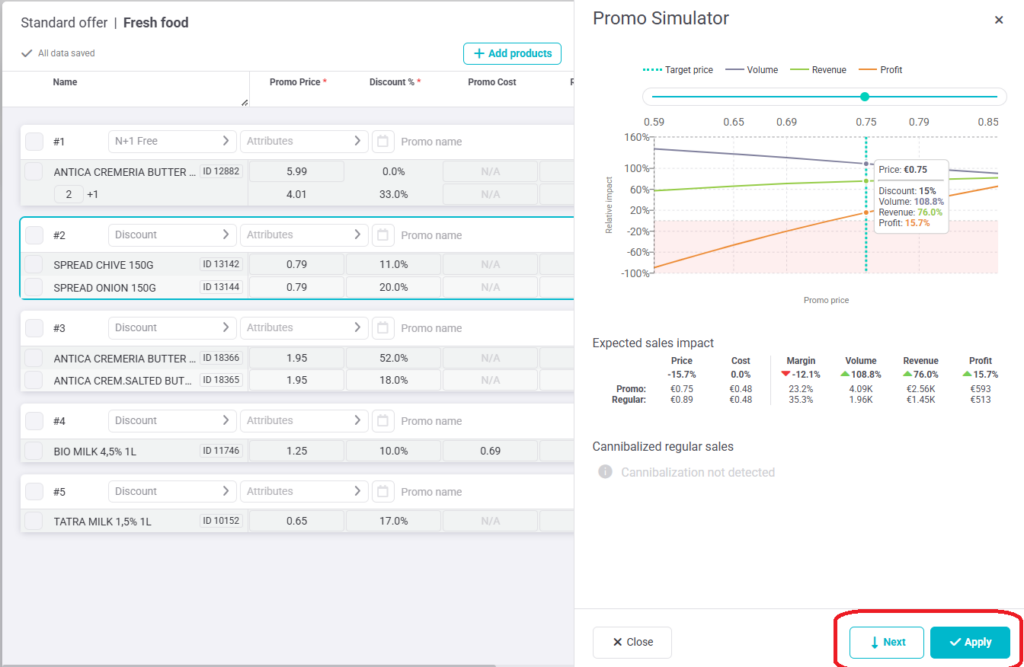
The secondary navigation has been redesigned to better group related actions as the application grows. Two new buttons have been added to the Promo Simulator to make confirming prices and moving between windows clearer.
With the new behavior:
- Next moves to the next available window without updating the promo price.
- Apply confirms the selected simulator price. The promo price is updated only after Apply is clicked, and the user is then moved to the next available window.
PRODUCT ARCHITECTURE OVERVIEW IN PRODUCT DETAIL
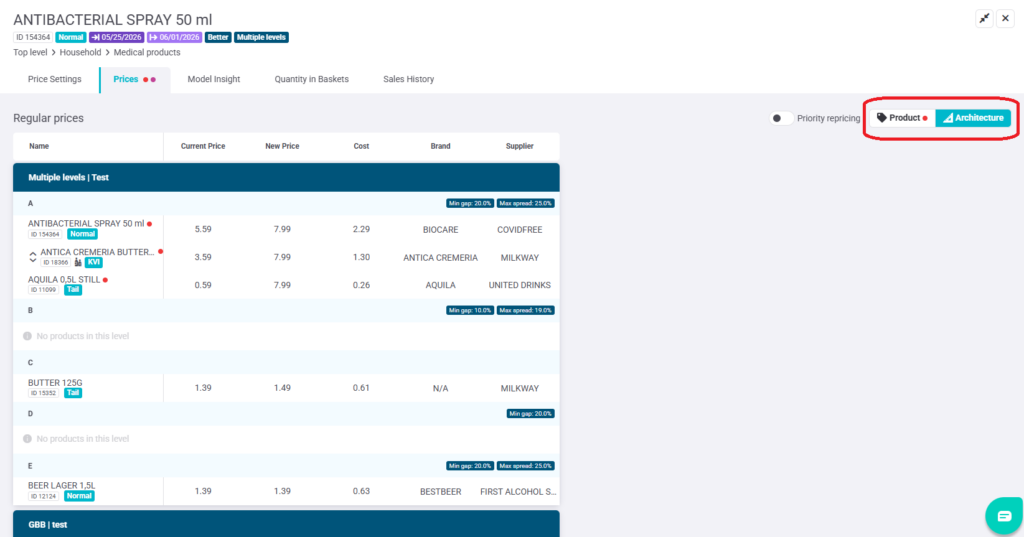
The Product detail view now includes an overview of all relevant Product Architecture groups, making it easier to understand when a price change is driven by Architecture without switching to the separate Product Architecture screen.
FIXES & UPGRADES
UX: Background colors signaling changes (price change, product removal, or a finalized row) are now shown only on the product name and in the New Price cell.
Fix: Notices in Multibuy are now dismissed with a single click.
Usability: The Family ID column has been added to the Multibuy module and is hidden by default.